Jul 28, 2026
|
3
min read

Share It On:
How to Use a WhatsApp Translator to Acquire Clients Overseas?
A lead from Brazil messages you in Portuguese asking about pricing. You do not speak Portuguese, so you copy the message into a separate translate tab, paste it back, type a reply in English, translate that too, and send it four minutes later. In those four minutes the lead has already messaged three other sellers, and one of them replied instantly in Portuguese.
This is the moment most cross-border client acquisition breaks down, not at the pitch, but at the first reply. A WhatsApp Translator extension fixes exactly this gap. There are two ways to translate messages on WhatsApp: the native in-app feature, which works but has real limits, and a dedicated WhatsApp Translator extension, which handles 100+ languages inline and lets you respond to new leads as fast as you would in your own language.
Install the WhatsApp Translator extension before you read further, so you can see inline translation working on your next incoming lead while you finish this guide.
How to Translate on WhatsApp When Reaching New Overseas Leads?
WhatsApp's built-in translation feature works directly inside chats on supported versions of the app. To use it:
If you often use WhatsApp on your desktop, there's a smart way to translate messages without switching tabs. With a WhatsApp translator extension on your browser, you can instantly translate incoming and outgoing messages directly on WhatsApp Web.
Step 1: Install the WhatsApp Translator Extension
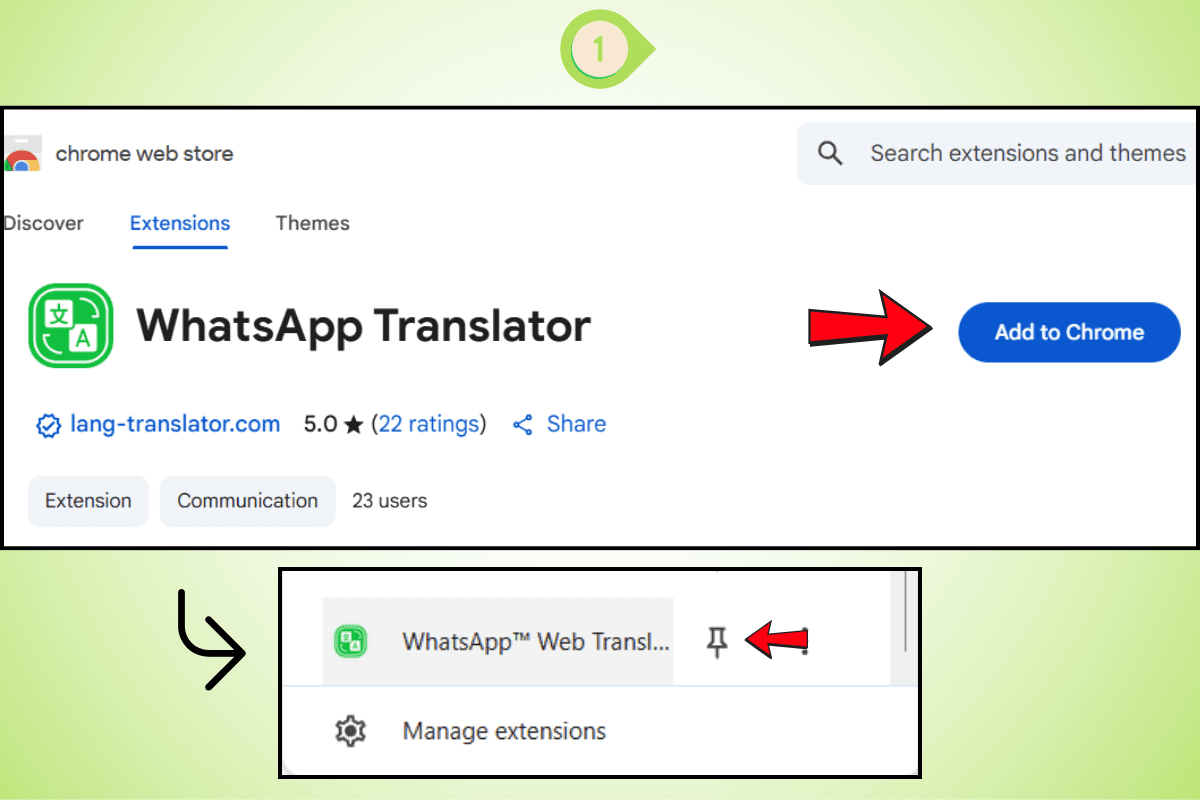
Add the WhatsApp Translator Extension from the Chrome Web Store and pin it to your browser for easy access.
Step 2: Detect Any Language
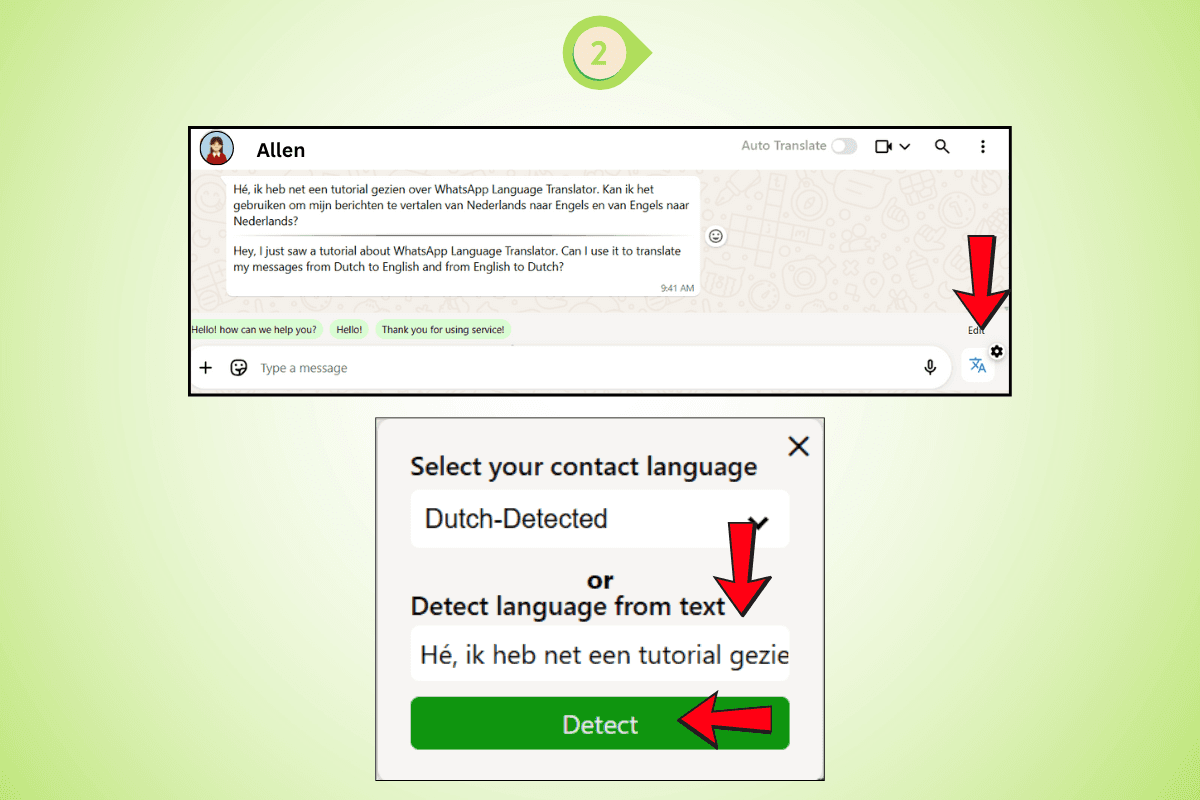
Paste the message. The WhatsApp translator automatically detects the language.
Step 3: Reply in the Same Language
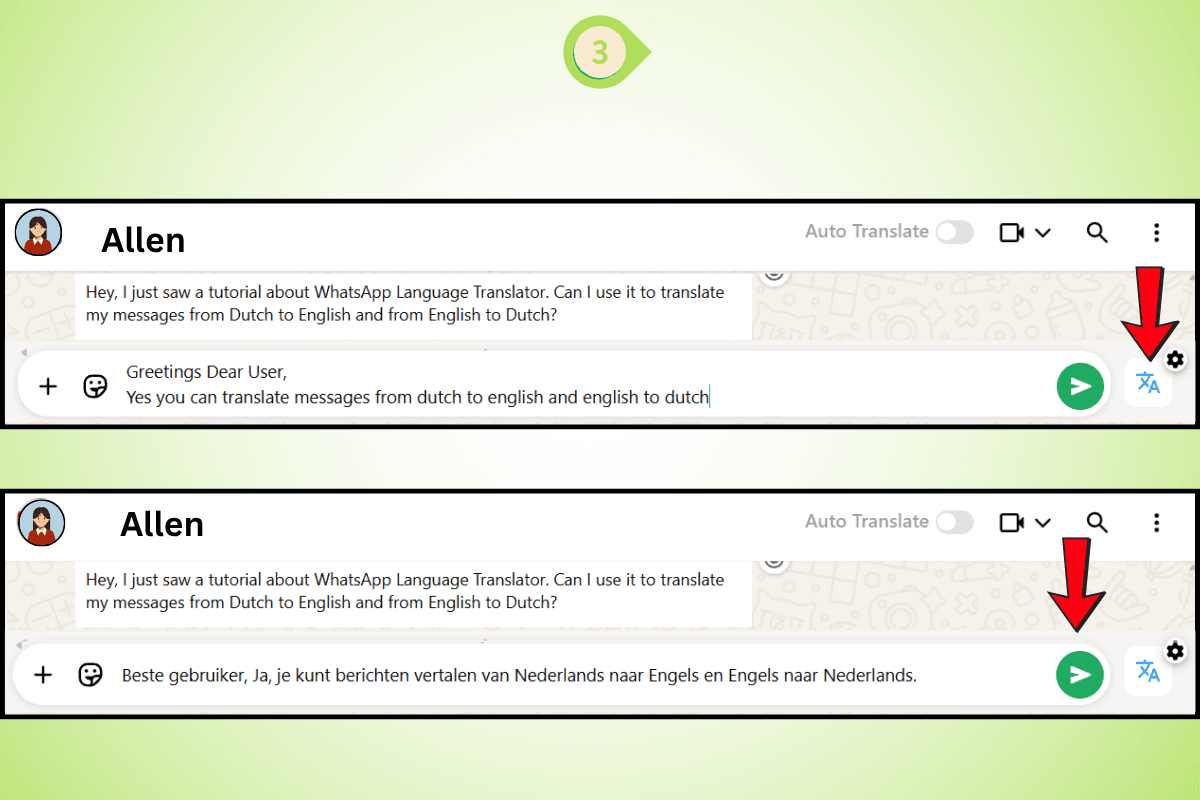
Type your response. The translator for WhatsApp will convert your reply accurately.
Step 4: Auto-Translate While Typing
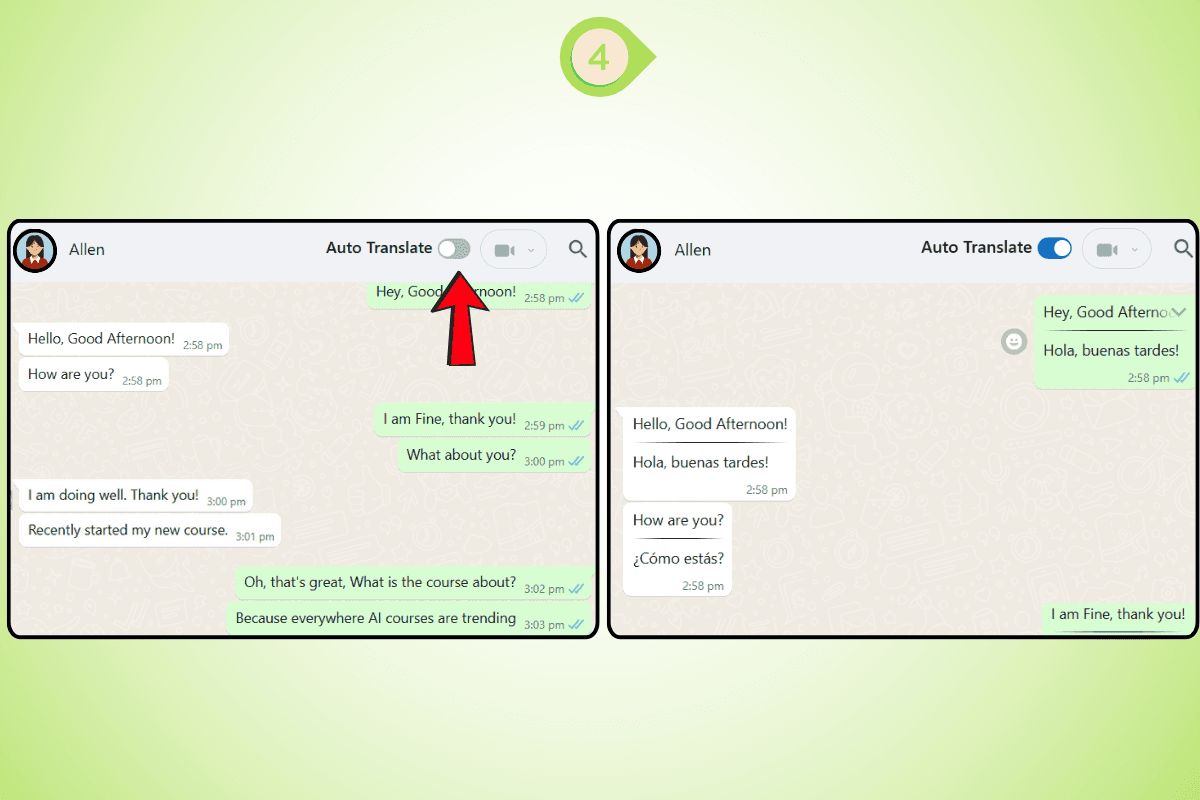
Turn on auto translate WhatsApp. Your messages are translated live, as you type. This process uses WhatsApp automatic translation and ensures fast and efficient multilingual WhatsApp chats.For a single conversation, this is fine. For someone actively acquiring clients across UAE, Brazil, and Indonesia in the same week, it becomes a bottleneck at the exact stage where speed decides whether a lead converts.
Where the Native Feature Slows Down Client Acquisition?
The native tool translates incoming messages one at a time and has no auto-translate for what you type back. You still leave WhatsApp to write your reply in the lead's language, which adds delay to the one part of acquisition where delay costs the most: first contact.
It also has a shorter language list than most global sellers need, and it behaves inconsistently across devices. A lead you cannot respond to fluently in the first few minutes is a lead a faster competitor picks up instead.
How to Use a WhatsApp Translator to Onboard International Leads Faster?
A WhatsApp Translator extension sits on top of WhatsApp Web and translates both directions of a conversation automatically. Incoming messages appear in your language, and your replies go out in the lead's language, without a separate tab.
Setting Up Your WhatsApp Translator in Under 2 Minutes
Install the WhatsApp Translator extension from the Chrome Web Store.
Open WhatsApp Web and log in as usual.
Turn on auto-translate from the extension icon and set your default language.
From there, every new lead who messages you in Arabic, Spanish, or French gets a reply at the same speed as a lead messaging in English. That speed is what turns a cold WhatsApp opt-in into an actual client.
What Most People Get Wrong About Using a WhatsApp Translator for Client Acquisition?
Sellers assume a WhatsApp Translator is only useful once a client is already talking to them. In practice, the biggest impact is earlier, at the acquisition stage, before trust exists and before a slow or garbled first reply gives a new lead a reason to go elsewhere.
A proper WhatsApp Translator translates what you type before it sends, not just what you receive. That difference is what lets a welcome message, a catalog link, or a pricing answer land in a new lead's language within seconds of them opting in, whether they are in Lagos, Lisbon, or Jakarta.
WhatsApp Auto Translate for Faster First-Response Time
In client acquisition, first-response time is often the single biggest factor in whether a lead converts. A prospect who messages five sellers usually buys from whoever replies first and replies clearly.
WhatsApp auto translate detects a new lead's language automatically and converts both sides of the chat without a manual step. That means your welcome flow, your catalog link, and your first pricing answer go out in the lead's language at the same speed they would in your own.
Auto-detects a new lead's language on their first message
Translates your welcome message and catalog links without extra steps
Keeps every acquisition conversation readable in one language on your end, not a mix of two
Translator for WhatsApp vs Manual Translation During Lead Outreach
Sellers still running acquisition through copy-paste translation are losing time on every single new lead, not just the difficult ones.
Manual Copy-Paste | WhatsApp Translator Extension | |
|---|---|---|
Time to first reply | Several minutes | Seconds |
Welcome flow translation | Manual, separate tab | Automatic, inline |
Broadcast lists to new leads | Written once, per language | Written once, auto-translated per lead |
Works on WhatsApp Web | Only with extra tabs open | Built in |
The manual method still works, it simply cannot keep pace with a real acquisition pipeline running across several markets at once.
Using a WhatsApp Translator to Build and Retain an Overseas Client Base
Client acquisition on WhatsApp does not stop at the first reply. It continues through the welcome flow, the follow-up, and the community you build around your product, and a WhatsApp Translator extension carries the language advantage through every one of those stages.
A few places it changes the outcome directly:
Lead magnets and opt-ins: A discount code or free shipping offer converts better when the confirmation message arrives in the lead's own language instantly.
Welcome flows: An automated welcome message with a catalog link builds more trust when it reads naturally instead of like a translated template.
Follow-ups: Abandoned cart or "still interested" messages land better in the lead's language, recovering sales that a delayed or English-only follow-up would lose.
Community groups: Product or region-specific WhatsApp groups grow faster when members can post in their own language and still be understood by everyone else.
If you want the full setup walkthrough before installing, the how-to-use guide covers every step in more detail.
Teams acquiring clients across multiple markets, whether based in Maharashtra, India or anywhere else, tend to see the same pattern: once outgoing replies translate automatically, response time and conversion on international leads start matching response time on local ones.
Every New Lead Is Only as Far Away as the Reply You Send Them
A WhatsApp Translator does not just remove a language barrier, it removes the hesitation that makes a seller reply slowly, or not at all, to a lead who does not speak their language. That hesitation, more than the words themselves, is what actually costs the sale.
Frequently Asked Questions
Does WhatsApp have a built-in translator?
Yes, WhatsApp has a native translate option on supported versions, accessed by long-pressing or right-clicking a message. It works one message at a time and does not translate what you type before sending, which slows down replies to new leads.
Can a WhatsApp Translator help with client acquisition?
Yes, it removes the delay between a new lead's first message and your reply, which is often the deciding factor in whether that lead converts to a client.
Is WhatsApp Translator free?
Many WhatsApp Translator extensions, including Lang Translator, offer a free tier to try inline translation before upgrading for higher usage or additional languages.
Can I translate WhatsApp messages automatically? Yes, a WhatsApp Translator extension with auto-translate turned on detects the incoming language and converts both incoming and outgoing messages without any manual step.
Does a WhatsApp Translator work on WhatsApp Web? Yes, a Chrome extension based WhatsApp Translator is built specifically to work on top of WhatsApp Web, translating messages inline as you chat with new and existing leads.
What languages does WhatsApp Translator support?
Most dedicated WhatsApp Translator extensions support 100+ languages, covering major client acquisition markets including Spanish, Portuguese, Arabic, French, German, Indonesian, and Mandarin.