May 19, 2026
|
5
min read
Share It On:
Introduction
Your customer messages you in Arabic. You copy it, open Google Translate in another tab, paste it, read the translation, switch back to WhatsApp, type your reply, and finally send it. By the time you finish, they have already moved to whoever responded faster.
That is the real cost of not knowing how to translate WhatsApp messages automatically. Not just minutes lost but deals, relationships, and conversations that arrive too late to matter.
The WhatsApp Web Translator Chrome extension lets you translate WhatsApp messages automatically inside your chat window with one click. It supports 100+ languages, auto-detects incoming message languages, translates both incoming and outgoing messages in real time, and lets you reply in the recipient's language without ever leaving WhatsApp Web. This guide shows you exactly how to use it and covers every other method available in 2026.
Why Translate WhatsApp Messages Automatically?
WhatsApp connects over 2 billion users across every language on the planet. If you handle any international communication, whether for business, customer support, or personal conversations, the ability to translate WhatsApp messages automatically changes how fast and confidently you can respond.
1. Stop Losing Deals to Slow Replies
When you can translate WhatsApp messages automatically, your first response arrives in seconds instead of minutes. Manual translation adds friction to every message. In cross-border sales and customer support, the business that replies faster in the buyer's own language consistently wins.
2. Auto-Translate WhatsApp Chat Without Switching Tabs
Every time you copy a message out of WhatsApp to translate it manually, you lose focus and your contact waits longer. WhatsApp auto translate through the WhatsApp Web Translator keeps the entire conversation inside one window. You read, understand, and reply without breaking your flow at any point.
3. Handle Multilingual Group Chats Seamlessly
Multilingual group chats are impossible to follow when messages arrive faster than you can copy-paste them one by one. When you auto-translate WhatsApp chat, every incoming message converts to your language in real time so you follow every thread without missing anything.
4. Translate WhatsApp Messages in Both Directions
Translating incoming messages is only half the job. The other half is replying in the language the other person speaks. A proper WhatsApp translator handles both directions simultaneously, not just reading incoming messages but also converting your outgoing replies accurately.
How to Translate WhatsApp Messages Automatically with WhatsApp Web Translator?
The WhatsApp Web Translator is the fastest and most complete way to translate WhatsApp messages automatically on desktop. It works as a Chrome extension, integrates directly into WhatsApp Web, and handles 100+ languages with one-click translation and full auto-translate WhatsApp mode. Here is exactly how to set it up.
If you often use WhatsApp on your desktop, there's a smart way to translate messages without switching tabs. With a WhatsApp translator extension on your browser, you can instantly translate incoming and outgoing messages directly on WhatsApp Web.
Step 1: Install the WhatsApp Translator Extension
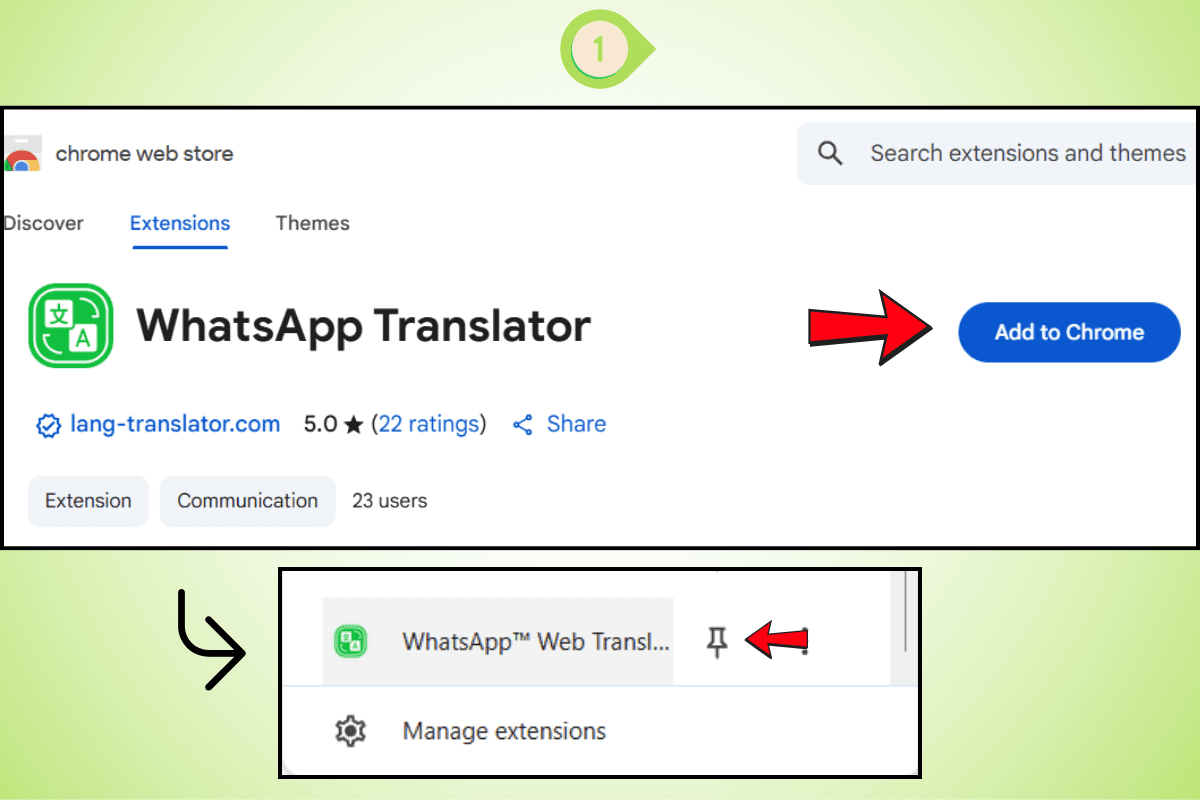
Add the WhatsApp Translator Extension from the Chrome Web Store and pin it to your browser for easy access.
Step 2: Detect Any Language
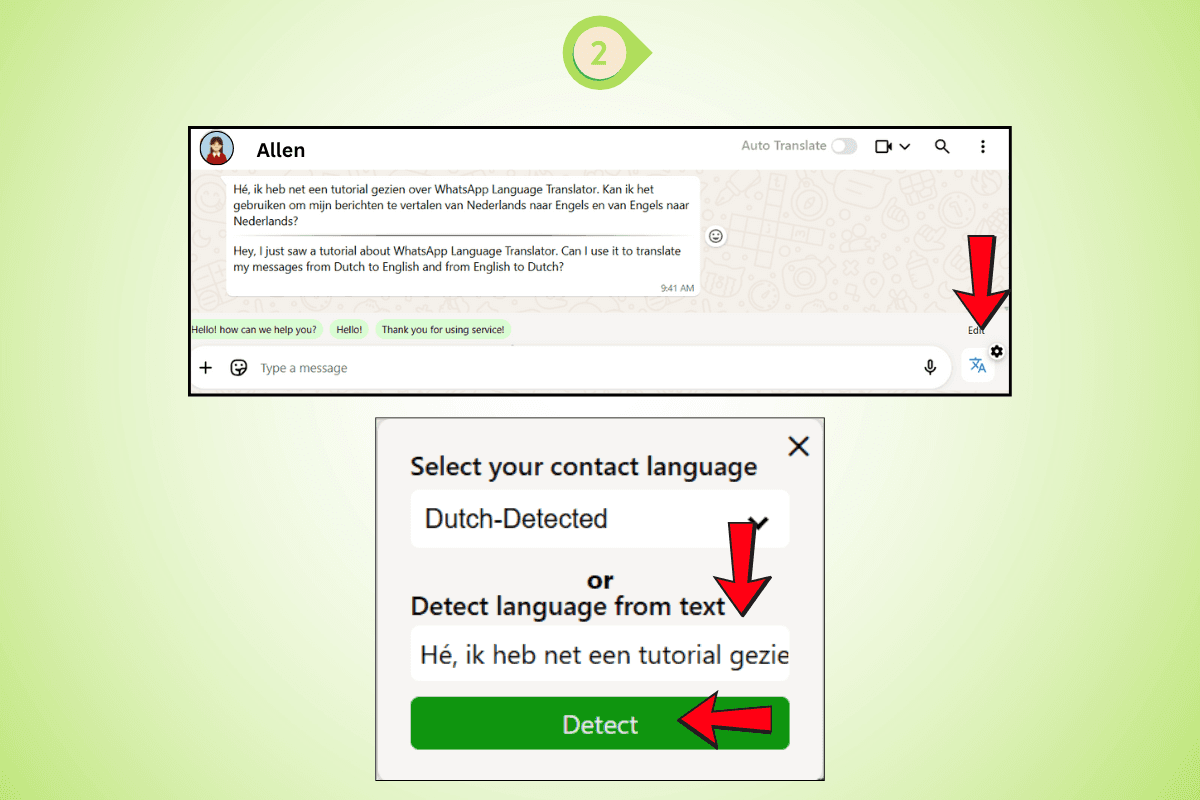
Paste the message. The WhatsApp translator automatically detects the language.
Step 3: Reply in the Same Language
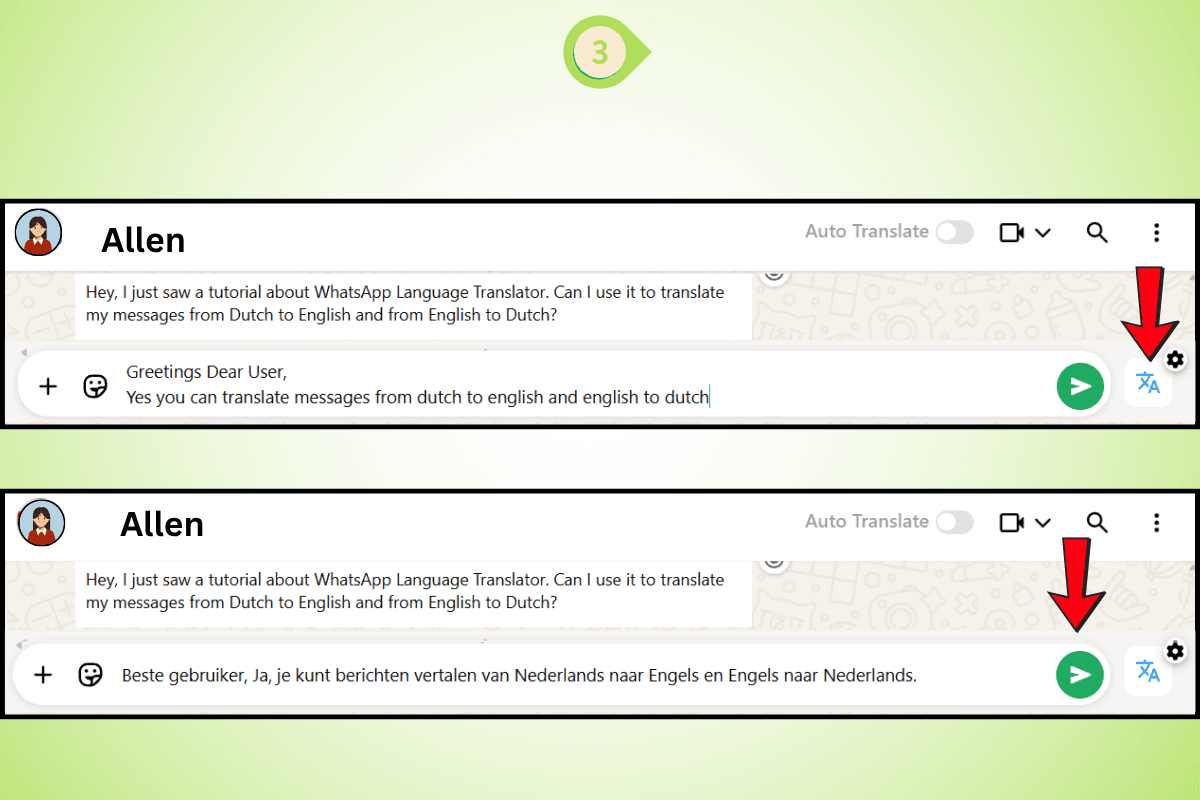
Type your response. The translator for WhatsApp will convert your reply accurately.
Step 4: Auto-Translate While Typing
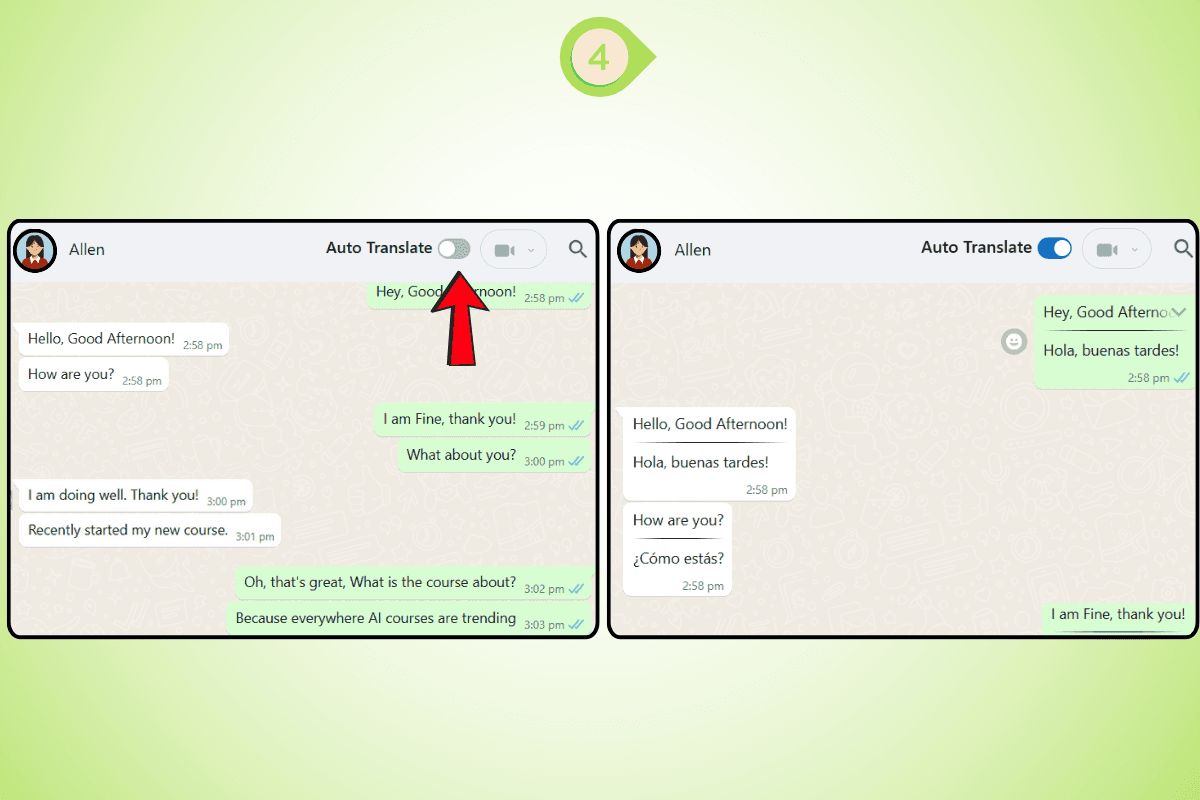
Turn on auto translate WhatsApp. Your messages are translated live, as you type. This process uses WhatsApp automatic translation and ensures fast and efficient multilingual WhatsApp chats.
Features That Make WhatsApp Web Translator the Best Way to Translate WhatsApp Messages Automatically
1. One-Click WhatsApp Message Translation
No more copy-pasting text out of WhatsApp into a separate translator. Click once on any incoming message and the WhatsApp translation appears directly inside the chat bubble. This is the fastest way to translate WhatsApp messages on desktop and it works across every individual chat and group chat on WhatsApp Web.
2. Auto-Translate WhatsApp Chats Instantly
Enable auto-translate mode and every incoming message converts to your preferred language in real time with zero manual steps. This is genuine WhatsApp auto translate built directly into your chat window, not a workaround that interrupts your flow or requires action between each message.
3. Detect Any Language Automatically
Receive or paste a message in any language and the extension detects it immediately. No dropdowns to navigate, no language to select before translating. The WhatsApp translator auto-detects and translates in a single step every time, covering every language pair across the 100+ supported languages.
4. Auto-Translate While Typing
Enable auto-translate WhatsApp mode and your outgoing messages convert to the recipient's language as you type. You never pause to manually translate what you are writing. The WhatsApp Web Translator handles it live so the conversation keeps moving at natural speed in both directions.
5. Reply in the Recipient's Language Without Manual Steps
Write in any language you are comfortable in and the WhatsApp Web Translator converts your reply accurately before it is sent. This bidirectional translation feature is what separates the WhatsApp Web Translator from every manual method for how to translate messages on WhatsApp. It solves both sides of the language barrier at once.
6. Supports 100+ Languages Including Hindi, Arabic, Thai, and More
The WhatsApp Web Translator supports over 100 languages. Whether you need to translate English to Hindi in WhatsApp, communicate with Arabic-speaking customers, handle Thai or Indonesian conversations, or manage any other language pair, the extension covers it without switching tools.
7. 50 Free Translations to Start
Install the extension, sign up for free, and get 50 message translations instantly with no payment details required. Start translating WhatsApp messages automatically right away and upgrade when you need more volume.
Other Ways to Translate WhatsApp Messages in 2026
If you are on mobile or want to know every available method, here is a complete breakdown. Each option works in specific situations but none match the speed and completeness of the WhatsApp Web Translator for anyone who communicates on desktop.
1. WhatsApp Built-in Auto-Translate on Android
WhatsApp launched a native auto-translate feature for Android in late 2025. It is available in most regions and rolling out for more language pairs gradually.
Step 1: Update WhatsApp to the latest version from the Google Play Store
Step 2: Open the chat where you want to translate WhatsApp messages automatically
Step 3: Long-press any incoming message and tap "Translate"
Step 4: Select your target language and enable auto-translate for all new messages in that chat
This works for Android users where the feature is live. The limitation is that it does not translate outgoing replies and availability varies by region and language pair.
2. WhatsApp Built-in Manual Translate on iOS and Android
For users where WhatsApp auto translate is not yet active, you can translate individual messages manually inside WhatsApp on both platforms.
Step 1: Open WhatsApp and find the message you want to translate
Step 2: Tap and hold the message bubble until the options menu appears
Step 3: Tap "Translate" and select your target language
This is practical for occasional messages but too slow for active conversations and does not handle outgoing reply translation at all.
3. How to Translate WhatsApp Messages Automatically on iPhone in 2026
WhatsApp's native auto-translate feature is currently Android-only and not available on iPhone. iPhone users have these options in 2026:
Step 1: Use Apple's Translate app. Copy the incoming message from WhatsApp, open the Translate app, paste it, and select your target language
Step 2: Install Gboard from the App Store and enable its translate mode in the keyboard toolbar. This auto-translates outgoing messages as you type inside WhatsApp but does not handle incoming message translation
Step 3: Access WhatsApp Web from a desktop or laptop browser and install the WhatsApp Web Translator Chrome extension. This is the only option for iPhone users to translate WhatsApp messages automatically in both directions including real-time incoming translation and outgoing reply conversion across 100+ languages
4. Translate WhatsApp Messages Using Gboard on Android
Step 1: Install Gboard from the Play Store and set it as your default keyboard
Step 2: Open WhatsApp and tap into any chat
Step 3: Tap the four dots in the keyboard toolbar and select "Translate"
Step 4: Set your source and target languages and type. Gboard translates your outgoing message before you send
Gboard handles outgoing messages only. Incoming messages still require a separate manual step to translate, meaning you still need a second method to fully translate WhatsApp conversation in both directions.
5. Translate WhatsApp Messages Using Samsung Keyboard
Step 1: Open WhatsApp and tap into any chat to bring up the Samsung keyboard
Step 2: Tap the three dots in the keyboard toolbar and select "Translate"
Step 3: Set your source and target languages and type your message
Like Gboard, this only translates outgoing messages and does not auto-translate WhatsApp chat for incoming messages.
6. Using Google Translate to Translate WhatsApp Messages
Step 1: Copy the message from WhatsApp
Step 2: Open translate.google.com or the Google Translate app
Step 3: Paste the text and select your target language
Step 4: Copy the translated output and paste your reply back into WhatsApp
Google Translate is reliable for meaning but the copy-paste workflow is slow and completely impractical for active conversations. It does not auto-translate WhatsApp chat and requires a manual step for every single message. The WhatsApp Web Translator replaces this entire workflow with a single click inside the chat window.
How to Translate WhatsApp Group Messages Automatically?
1. Use WhatsApp Web Translator to Auto-Translate WhatsApp Group Chats
The WhatsApp Web Translator works in group chats exactly the same way it works in individual conversations. Enable auto-translate WhatsApp mode and every incoming group message converts to your language automatically in real time regardless of which language each member writes in. This is the only method that makes it genuinely practical to translate WhatsApp messages automatically in active group chats on desktop where messages arrive faster than any manual method can follow.
2. WhatsApp Built-in Translation per Message in Groups on Android
On Android where WhatsApp's native translation feature is available, long-press individual messages in a group chat and tap Translate. Set a default target language for the group and WhatsApp applies it to every incoming message without requiring you to select a language each time.
3. Translating WhatsApp Group Messages on iPhone
iPhone users in multilingual group chats can copy individual messages and paste them into Apple's Translate app for basic translation. For anything faster, accessing WhatsApp Web from a desktop browser and using the WhatsApp Web Translator is the only way to auto-translate WhatsApp group messages in real time on iPhone without a manual step per message.
Tips for Accurate WhatsApp Message Translation
1. Write Clearly for Better Auto-Translate WhatsApp Results
Translation tools handle standard language far more accurately than slang, heavy abbreviations, or regional expressions. When writing messages that the WhatsApp Web Translator will auto-translate, keep your language direct and clear to maintain accuracy across every language pair.
2. Enable Auto-Translate for Active Conversations
If you are in an ongoing conversation with someone writing in a different language, enable auto-translate WhatsApp mode rather than clicking translate on each message manually. It keeps the conversation flowing at natural speed and removes friction from every exchange.
3. Double-Check Business-Critical Messages
For messages involving prices, quantities, deadlines, or specific commitments, review the WhatsApp translation before sending. The WhatsApp Web Translator is accurate for everyday conversation but a manual check on high-stakes details protects you from costly misunderstandings.
4. Set the Correct Language Pair for Consistent Results
If you know the language your contact uses, configure it as the source language in your extension settings. A pre-set language pair gives faster and more consistent results than auto-detection across a long active conversation.
Who Uses WhatsApp Web Translator to Translate WhatsApp Messages Automatically?
The need to translate WhatsApp messages automatically is not limited to one type of user. Anyone who communicates across language barriers on WhatsApp Web benefits from having a WhatsApp translator built directly into their chat window.
1. Cross-Border Sellers and E-Commerce Businesses
International sellers receive buyer inquiries in dozens of languages every day. Instead of losing time copy-pasting messages into a separate translator, they use the WhatsApp Web Translator to auto-translate WhatsApp chat in real time and reply in the buyer's language instantly. Faster replies mean fewer abandoned conversations and more completed orders.
2. Customer Support Teams
Support teams handling global customers cannot afford to translate WhatsApp messages manually at scale. With auto-translate WhatsApp enabled through the WhatsApp Web Translator, agents understand every incoming message the moment it arrives and respond in the customer's own language without involving a third-party tool or a human translator.
3. Freelancers and Remote Workers
Freelancers working with international clients on WhatsApp Web use the WhatsApp translator to communicate clearly across language barriers without interrupting their workflow. Whether the conversation is about deliverables, timelines, or feedback, translate WhatsApp messages automatically keeps the exchange professional and accurate on both sides.
4. Importers and Exporters
Trade negotiations on WhatsApp happen fast. Importers and exporters dealing with suppliers and buyers across Asia, the Middle East, and Latin America use the WhatsApp Web Translator to translate WhatsApp messages automatically so no commitment, quantity, or deadline gets lost in translation during an active thread.
5. Marketing and Sales Teams
Sales teams running outreach campaigns across multilingual markets use WhatsApp auto translate to engage leads in their native language from the first message. Responding in a lead's own language signals respect and builds trust faster than a generic English reply, making the WhatsApp Web Translator a practical tool for anyone running WhatsApp-based sales workflows.
Industries That Benefit Most from Translating WhatsApp Messages Automatically
The ability to translate WhatsApp messages automatically is valuable across nearly every industry where cross-border communication happens on WhatsApp. These are the industries where the WhatsApp Web Translator delivers the highest impact.
1. E-Commerce and Retail
E-commerce businesses selling across borders deal with buyer inquiries, order updates, and return requests in multiple languages simultaneously. WhatsApp translation removes the language barrier from every stage of the customer journey, from the first product inquiry to post-purchase support, without slowing down the team.
2. Logistics and Supply Chain
Logistics companies coordinate with warehouses, carriers, and customs agents across multiple countries and languages on WhatsApp every day. When you translate WhatsApp messages automatically, shipment updates, delivery instructions, and exception notifications reach the right people in the right language without delay or miscommunication.
3. Healthcare and Medical Tourism
Hospitals and clinics serving international patients use WhatsApp Web as a primary communication channel for appointments, pre-treatment queries, and follow-up care. The ability to auto-translate WhatsApp chat in real time makes it possible for medical teams to communicate clearly with patients regardless of language, which directly affects patient experience and safety.
4. Travel and Hospitality
Hotels, tour operators, and travel agents handling international bookings receive inquiries in every major language. With WhatsApp auto translate enabled through the WhatsApp Web Translator, teams respond to booking requests, itinerary questions, and special requirements in the guest's native language, improving conversion and satisfaction at the same time.
5. Education and EdTech
Educational platforms and tutoring services with international students use WhatsApp for enrollment queries, course guidance, and student support. Translating WhatsApp messages automatically allows institutions to serve students from non-English-speaking countries without maintaining separate multilingual support teams for every language.
6. Manufacturing and B2B Trade
Manufacturers selling to distributors and buyers across South Asia, Southeast Asia, the Middle East, and Latin America conduct most of their relationship management on WhatsApp. The WhatsApp Web Translator lets manufacturing teams translate WhatsApp messages automatically during price negotiations, product specification discussions, and order confirmations, reducing the risk of costly miscommunication on high-value transactions.
Conclusion
Knowing how to translate WhatsApp messages automatically in 2026 is essential for anyone communicating across borders. Whether you handle international customer support, multilingual group chats, or global sales conversations, the ability to translate WhatsApp messages in real time changes how effectively you communicate.
The WhatsApp Web Translator is the fastest and most complete solution to translate WhatsApp messages automatically on WhatsApp Web. One click, 100+ languages, auto-translate WhatsApp chat in both directions, and reply in the recipient's language without switching a single tab. Install it free and stop losing time and deals to manual translation.
Frequently Asked Questions
How Do I Turn On Auto-Translate on WhatsApp?
The fastest way to turn on auto-translate WhatsApp on desktop is to install the WhatsApp Web Translator Chrome extension, open WhatsApp Web, and enable auto-translate mode in the extension settings. Every incoming message will then translate WhatsApp messages automatically in real time without any manual steps. On Android, WhatsApp's native translation feature lets you long-press any incoming message, tap Translate, select your language, and enable auto-translate for that specific chat.
On WhatsApp Web: install WhatsApp Web Translator and enable auto-translate mode in extension settings
On Android: long-press a message, tap Translate, select your language, enable auto-translate for the chat
On iPhone: use Gboard for outgoing messages or use WhatsApp Web Translator on desktop for full auto-translate WhatsApp functionality including incoming messages
Is There a Way to Automatically Translate Text Messages?
Yes. The most complete way to automatically translate WhatsApp messages on any device is the WhatsApp Web Translator Chrome extension on WhatsApp Web. It translates incoming messages in real time and converts your outgoing replies into the recipient's language, making it the only method that handles auto-translate WhatsApp chat in both directions simultaneously. On Android, WhatsApp's native feature handles incoming messages automatically where available by region.
Use WhatsApp Web Translator on WhatsApp Web to translate WhatsApp messages automatically in both directions across 100+ languages
Use WhatsApp's native auto-translate on Android if available in your region
Use Gboard on Android or iPhone to auto-translate WhatsApp outgoing messages as you type
How Can I Translate a Text on WhatsApp?
To translate a text on WhatsApp, long-press any message bubble and tap Translate if the option appears in your region. On WhatsApp Web, the WhatsApp Web Translator adds a translate icon directly next to every message bubble so you can translate any WhatsApp message with a single click without leaving the chat. This is the fastest and most practical way to translate in WhatsApp for anyone using the web version on desktop.
On mobile: long-press any message and tap Translate
On WhatsApp Web: click the translate icon next to any message using the WhatsApp Web Translator extension
Manual method: copy from WhatsApp, paste into translate.google.com, copy the translation back manually
How Do I Activate Google Translate on WhatsApp?
Google Translate does not integrate directly into WhatsApp as a native feature. To use it, copy the message from WhatsApp, paste it into translate.google.com or the Google Translate app, and copy the translated text back into the chat manually. A faster option is installing Gboard and enabling its translate mode in the keyboard toolbar to translate outgoing messages as you type. For WhatsApp Web, the WhatsApp Web Translator replaces the entire Google Translate copy-paste workflow with one-click WhatsApp translation directly inside the chat window.
Copy message from WhatsApp, paste into translate.google.com, copy translation back into chat manually
Install Gboard, tap the translate icon in the keyboard toolbar, type and send translated messages
Use WhatsApp Web Translator on WhatsApp Web to translate WhatsApp messages automatically without Google Translate
How to Translate WhatsApp Messages Automatically on Android in 2026?
WhatsApp has a native auto-translate feature on Android available in most regions as of late 2025. Update WhatsApp from the Play Store, open a chat, long-press any incoming message, tap Translate, select your target language, and enable auto-translate for all new messages in that chat. For WhatsApp Web on desktop, the WhatsApp Web Translator Chrome extension gives you the same ability to translate WhatsApp messages automatically with one-click translation, auto-translate mode, and 100+ language support including Hindi, Arabic, Thai, and all major language pairs.
Update WhatsApp on Android from the Play Store to access the native auto-translate WhatsApp feature
Long-press any message, tap Translate, select your language, enable auto-translate for that chat
For WhatsApp Web on desktop: install WhatsApp Web Translator for complete auto-translate WhatsApp functionality in both directions
How to Translate WhatsApp Messages Automatically on iPhone in 2026?
WhatsApp's native auto-translate feature is currently Android-only and not yet available on iPhone. iPhone users can translate WhatsApp messages using Apple's Translate app for individual incoming messages, Gboard for outgoing messages as they type, or by accessing WhatsApp Web on a desktop browser and installing the WhatsApp Web Translator Chrome extension. The WhatsApp Web Translator is the only option for iPhone users to translate WhatsApp messages automatically in both directions including real-time incoming translation and outgoing reply conversion across 100+ languages without any manual steps per message.
Apple Translate app: copy message from WhatsApp, paste into the Translate app, select your target language
Gboard on iPhone: install from the App Store, enable translate mode in the keyboard toolbar inside WhatsApp
WhatsApp Web Translator on desktop: the only way to fully auto-translate WhatsApp chat on iPhone including incoming messages and reply conversion